
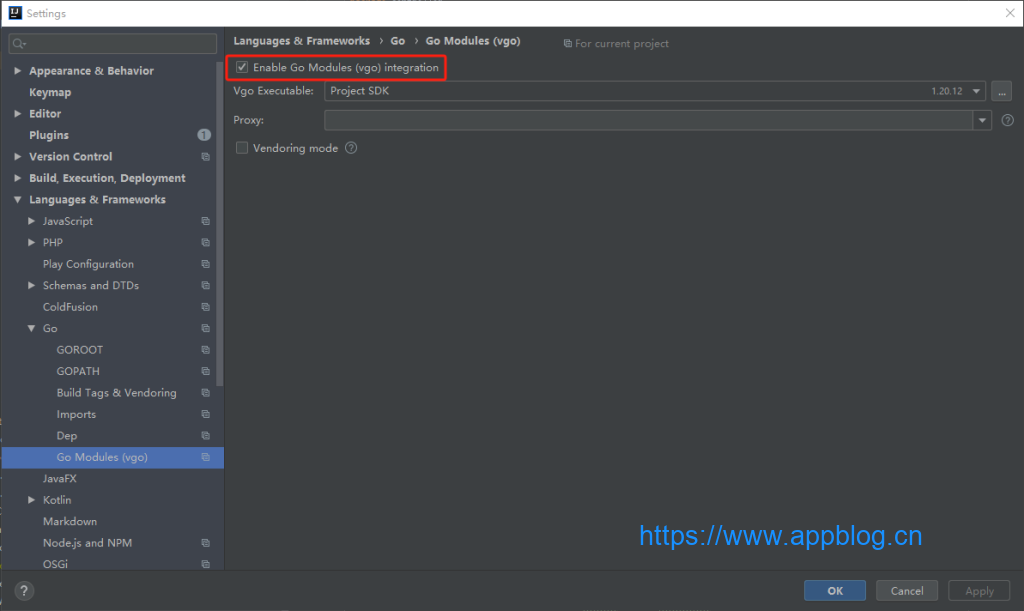
golang项目开启mod模式并安装依赖完成后,import导入代码仍然飘红 原因是索引路径问题,此时当前项目的依赖路径,可以看到External Libraries只有Go SDK,并没有Go Modules 解决:File -> Settings -> Languages &
 2024-01-13

问题描述 在IDEA配置GOROOT本地路径 Languages & Frameworks -> Go -> GOROOT 时报错: The selected directory is not a valid home for Go SDK 出现这个错误的原因是 idea 的 G
2024-01-13

go项目开发时,报cc1.exe: sorry, unimplemented: 64-bit mode not compiled in错误 # git clone https://github.com/Calcium-Ion/new-api.git # cd new-api # go version
2024-01-13

官方下载:https://golang.google.cn/dl/ 推荐下载:go1.20.12 # go version go version go1.20.12 windows/amd64 # set GOPROXY=https://goproxy.cn IDEA配置 插件安装:Go IDEA
2024-01-11

Python pip代理设置 pip --proxy=http://username:password@192.168.16.28:8118 install 组件名称 Go代理设置 export http_proxy=http://192.168.16.28:8118 export https_p
2023-02-25

安装依赖 yum install wget gcc gcc-c++ g++ autoconf autoconf2.13 automake make cmake m4 openssl openssl-devel curl libcurl-devel zlib-devel libxml2-devel g
2023-02-25