LinearLayout分割线
1) 直接在布局中添加一个view
<View
    android:layout_width="match_parent"
    android:layout_height="1px"
    android:background="#000000"
    />
2) 使用LinearLayout的divider属性
<LinearLayout
    android:divider="@drawable/divider"
    android:showDividers="middle"
    android:dividerPadding="10dp"
LinearLayout的layout_weight占比计算
假设2个子控件设计的weight值分别为a,b(a+b=1),则控件的实际占比为
- 1-a/(a+b)
- 1-b/(a+b)
假设3个子控件设计的weight值分别为a,b,c(a+b+c=1),则控件的实际占比为
- 1-2a/(a+b+c)
- 1-2b/(a+b+c)
- 1-2c/(a+b+c)
LinearLayout的layout_gravity
-
当 android:orientation="vertical" 时,只有水平方向的设置才起作用,垂直方向的设置不起作用。
即:left、right、center_horizontal 是生效的。 -
当 android:orientation="horizontal" 时,只有垂直方向的设置才起作用,水平方向的设置不起作用。
即:top、bottom、center_vertical 是生效的。
<LinearLayout
    android:layout_width="wrap_content"
    android:layout_height="wrap_content"
    android:orientation="horizontal"
    >
    <TextView
        android:layout_width="wrap_content"
        android:layout_height="wrap_content"
        android:text="登陆"
        android:layout_gravity="left"
        />
    <TextView
        android:layout_width="wrap_content"
        android:layout_height="wrap_content"
        android:text="注册"
        android:layout_gravity="right"
        />
</LinearLayout>
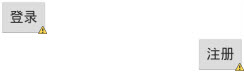
弊端:如果水平方向设置左右对齐,就会出现如下效果
使用LinearLayout的问题:当界面比较复杂的时候,需要嵌套多层的 LinearLayout,这样就会降低UI Render的效率(渲染速度)。总结就是:尽量使用RelativeLayout + LinearLayout的weight属性搭配使用。